

How To Enable Location During In-Person Verification (IPV)?


In order to complete the KYC process on Grip Invest smoothly, it is mandatory to give access to your location on your device. If the location access is not allowed, you will get an error as shown below:
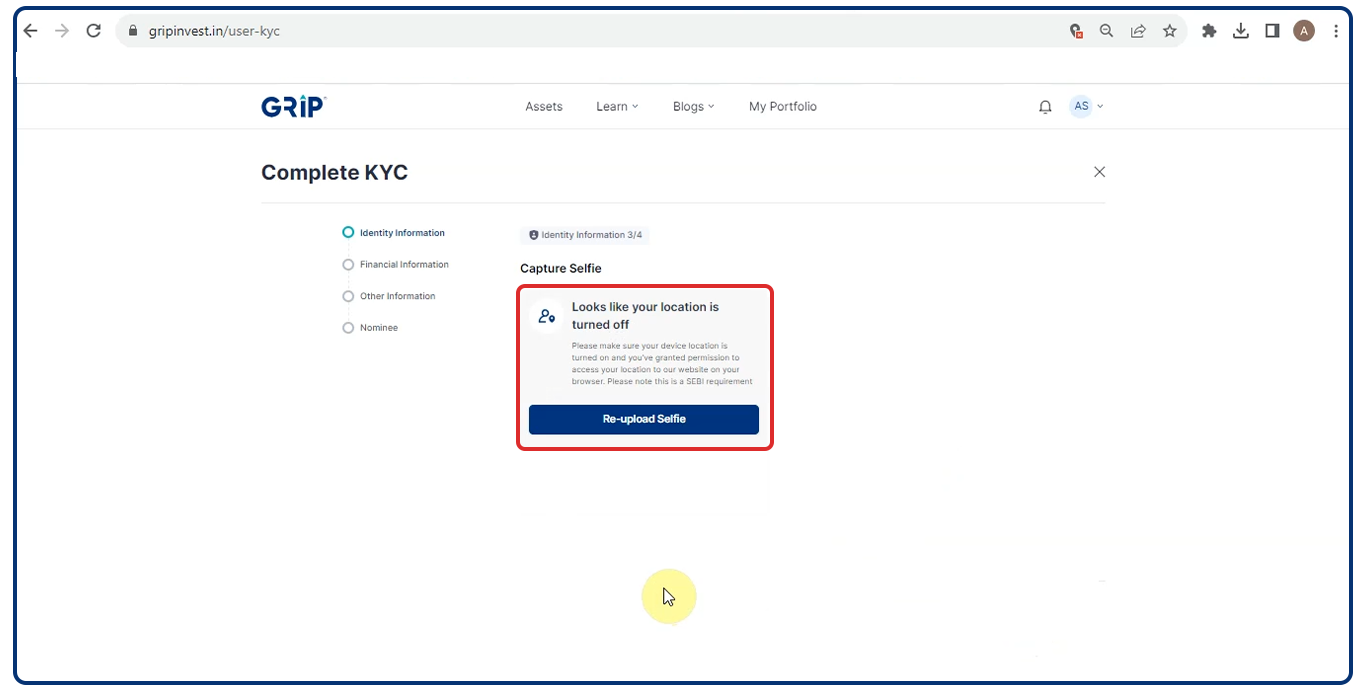
Steps to Allow Location Access
Please follow the below steps to provide Location Access:
For Google Chrome
- Option 1
Go to URL - Click on View site information (lock symbol) > Location > Allow > Reload page.

- Option 2
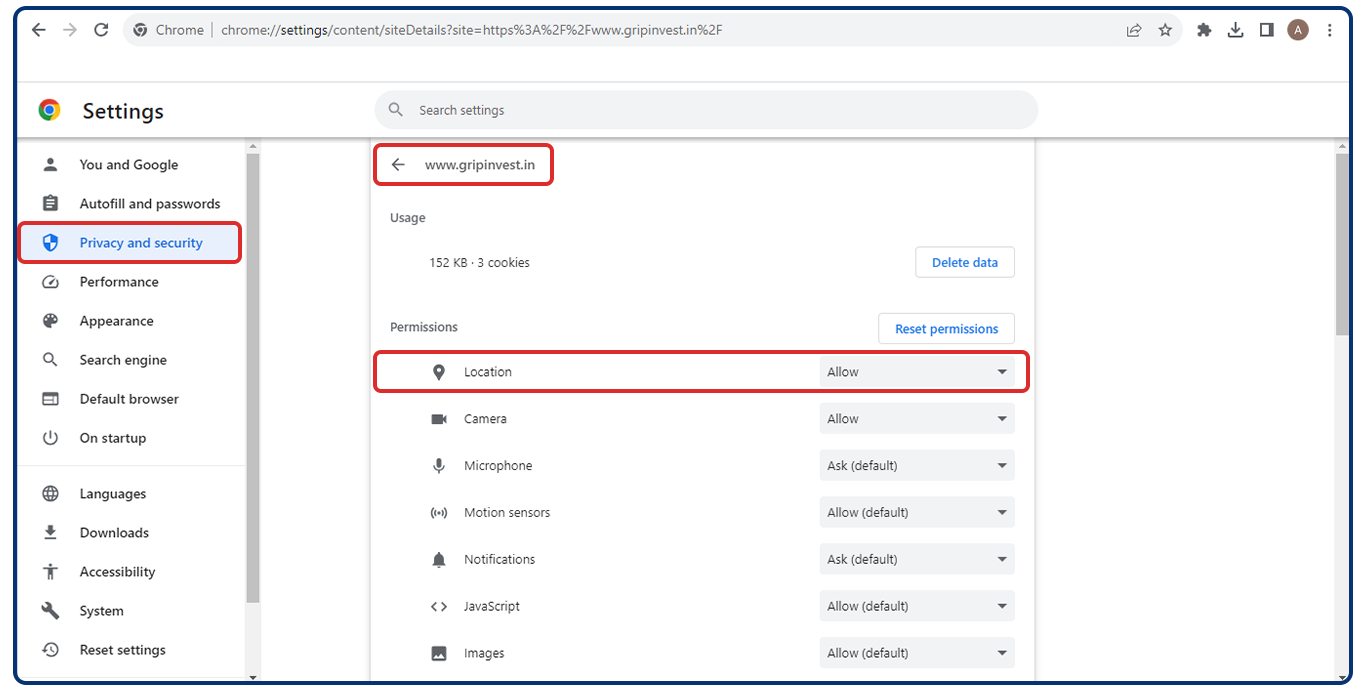
You can follow the below steps to allow access to Location in Google Chrome:
- Go to Settings on Chrome
- Select ‘Privacy and Security’ and then ‘Site Setting’
- Select website www.gripinvest.in
- Ensure that Location access is set to ‘Allow’
For iOS
If you are using iOS then you will be required to give camera access permission to the app that you are using for IPV, please follow the below steps:
- Go to Settings and click on Privacy settings
- Open the ‘Location Services’ settings and look for the app that you are using for IPV
- Allow location access permission to the app

For Android
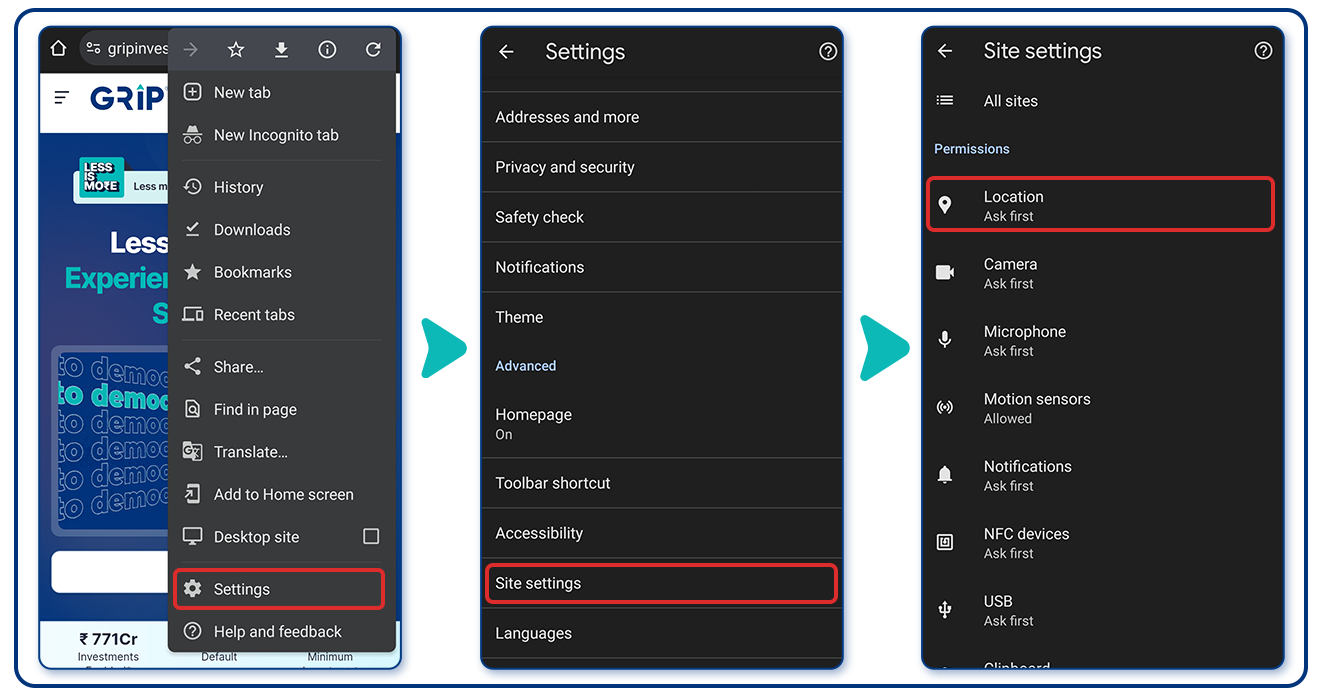
In case you are using an Android device, you can follow the below steps:
- Click on Settings
- Go to Site Settings
- Ensure that the Location is set to ‘Ask First’
Please note that this may vary depending on the device you are using.
Note:
- We would recommend you use Google Chrome for the IPV process.
- After allowing the permissions, if you still face the issue then try it after clearing the browser cache and cookies.
Should you have any queries, please reach out to us at invest@gripinvest.in or contact your RM for immediate assistance.
FAQ's
1. Why does Grip Invest ask for location access during the liveliness verification step?
It is mandatory to have location access while completing KYC for all SEBI- registered brokers. It helps us ensure that the account is being opened by a genuine user, hence protecting your investments. Additionally, there are certain debt instruments in which NRIs cannot invest. With location access, we ensure these compliance requirements of SEBI.
2. Will giving location access require changing my device’s global location settings?
No. You just need to allow the browser or app to access your location when prompted. It’s a one-time permission for that verification session.
3. What if I’m using a public or shared device—can I safely enable location and proceed?
Yes, but grant access only for that session. Once verification is complete, you can remove or revoke the permission from your browser settings.
4. Does enabling location mean Grip Invest will track my live location continuously?
No. The platform uses your location only for that specific verification step and doesn’t track you afterwards.
5. Can I complete the KYC liveliness step if I refuse location access?
No, location access is mandatory to complete the liveness verification successfully.
Want to stay at the top of your finances?
Join the community of 2.5 lakh+ investors and learn more about Grip Invest, the latest financial knick-knacks and shenanigans that take place in the world of investing.
Happy Investing!
Disclaimer - Investments in debt securities are subject to risks. Read all the offer-related documents carefully. The investor is requested to take into consideration all the risk factors before the commencement of trading. This communication is prepared by Grip Broking Private Limited (bearing SEBI Registration No. INZ000312836 and NSE ID 90319) and/or its affiliate/ group company(ies) (together referred to as “Grip Invest”) and the contents of this disclaimer are applicable to this document and any and all written or oral communication(s) made by Grip Invest or its directors, employees, associates, representatives and agents. This communication does not constitute advice relating to investing or otherwise dealing in securities and is not an offer or solicitation for the purchase or sale of any securities. Grip Invest does not guarantee or assure any return on investments and accepts no liability for the consequences of any actions taken based on the information provided. For more details, please visit https://www.gripinvest.in/.
Registered Address - 106, II F, New Asiatic Building, H Block, Connaught Place, New Delhi 110001.


