

YES Bank Debit Card PIN Generation: A Simple Step-by-Step Guide


Most people do not think twice about their debit card PIN until something goes wrong. Maybe the card is new, the old PIN stopped working, or an ATM just refuses to cooperate. Suddenly, a small banking task turns into a roadblock in your day.
The good part is that generating or resetting your YES Bank debit card PIN is actually quick once you know the right steps. You are not limited to one method either. You can do it through netbanking, the mobile app, an ATM, or even a simple phone call using IVR.
This guide keeps things simple. It walks you through each option, flags common issues people run into, and shows how everyday banking habits connect to smarter money management over time.
Step-by-Step Process For PIN Generation
Before you begin, keep your debit card, registered mobile number, and basic account details handy. Your registered mobile number is crucial, as OTP verification is mandatory across all methods.
Via NetBanking
- Visit the YES Bank NetBanking portal and log in using your Customer ID and password.
- Navigate to Debit Card Services or Card Management.
- Select Generate or Reset Debit Card PIN.
- Enter your debit card details and verify using the OTP sent to your registered mobile number.
- Set your new PIN and confirm it.
Your PIN is updated instantly and ready to use.
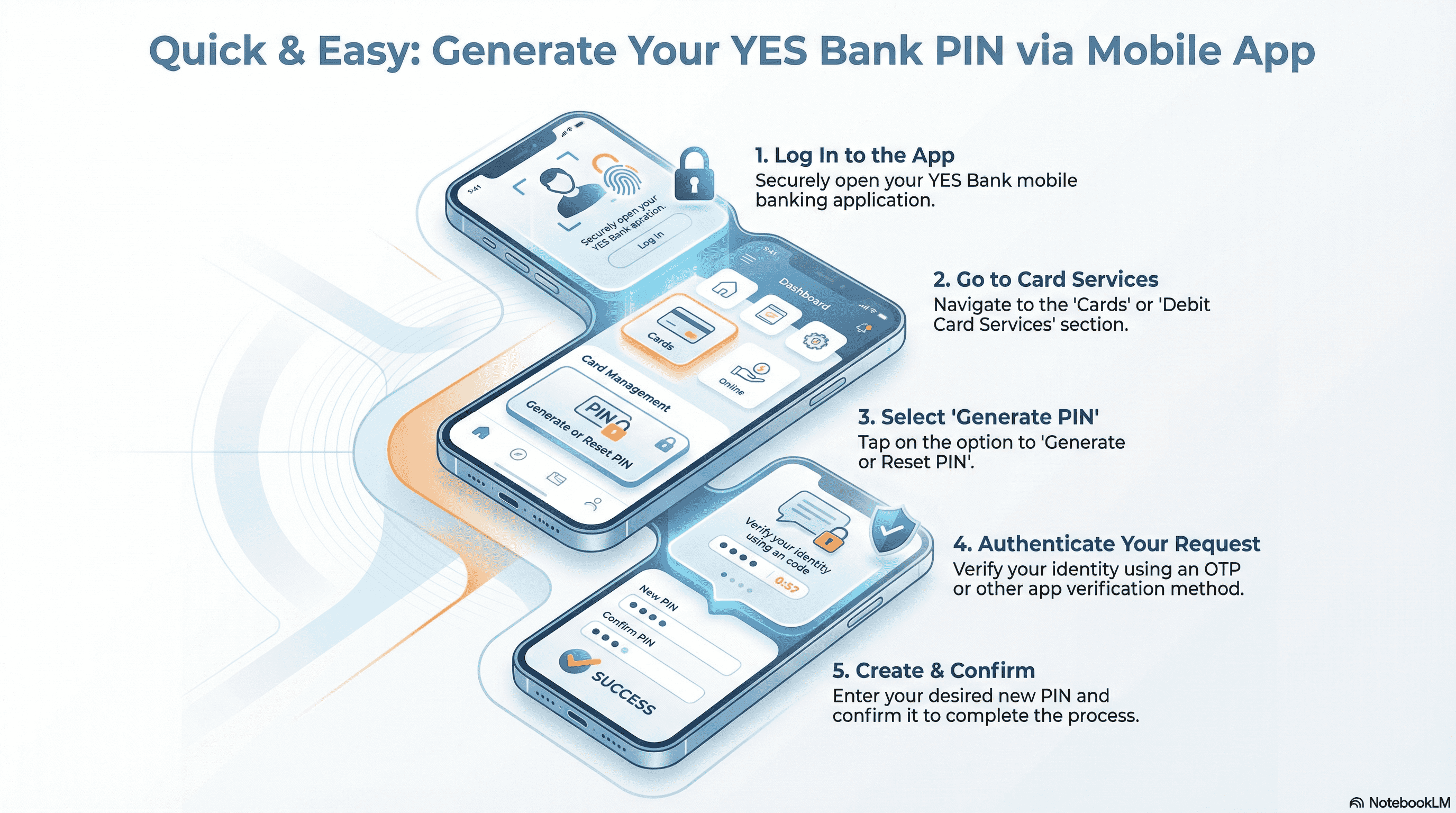
Via Mobile App
- Open the YES Bank mobile banking app and log in securely.
- Go to Cards or Debit Card Services.
- Tap on Generate or Reset PIN.
- Authenticate using OTP or app-based verification.
- Create and confirm your new PIN.
This is one of the fastest methods if you already use the app regularly.
Via ATM
- Visit a YES Bank ATM and insert your debit card.
- Select Create or Reset PIN on the screen.
- Enter your account details or card details as prompted.
- Verify using the OTP sent to your registered mobile number.
- Set your new PIN and confirm.
Once completed, your debit card becomes active immediately.
Via IVR (Phone Banking)
- Call the YES Bank customer care number from your registered mobile number.
- Follow the IVR prompts for debit card PIN generation.
- Enter the required card or account details.
- Verify with OTP.
- Set your new PIN as instructed.
This option is useful if you do not have internet access at the moment.
Common Issues And Troubleshooting
- OTP not received: Check network coverage and confirm your mobile number is registered with the bank.
- Incorrect details entered: Re-enter card and account details carefully; even small mismatches cause failure.
- ATM transaction failed: Try another YES Bank ATM or switch to netbanking or the mobile app.
- Card blocked due to multiple attempts: Contact customer care to unblock the card before retrying.
Most issues are temporary and get resolved by switching the method or waiting a few minutes.
Tips For Creating A Secure PIN (Investor Angle)
Your debit card PIN protects your cash flow, which directly impacts your ability to save and invest.
- Avoid predictable numbers like birth years or repeated digits.
- Never reuse old PINs or share them with anyone.
- Change your PIN periodically, especially if you use ATMs frequently.
- Think of your PIN as the lock on your monthly budget.
Strong financial discipline starts with protecting everyday money
How Debit Card Usage Fits Into Your Overall Financial Planning
Here is the thing. Debit cards are for spending. Investment instruments are for wealth growth.
Using your debit card wisely helps you track expenses, control impulsive spending, and see where your money actually goes each month. That clarity makes it easier to set aside money for investments.
Even a small habit matters.
For example, allocating just INR 1,000–INR 5,000 monthly into stable fixed-income instruments can compound meaningfully over time without adding stress to your budget.
Spending control creates room for investing. The two go hand in hand.
Explore Safe, Fixed-Return Investments
Getting your YES Bank debit card PIN sorted is a small win, but small wins matter. When everyday banking works smoothly, you spend less time fixing problems and more time actually managing your money.
Debit cards are for day-to-day spending. Real financial progress comes from what you do with what is left after that. Tracking expenses, setting limits, and staying consistent create the space needed to start investing without pressure.
At Grip Invest, the idea is simple: help investors turn disciplined saving into steady wealth growth through regulated fixed-income options like corporate bonds and SDIs. When mindful spending and sensible investing work together, your financial plan feels a lot more in control.
FAQ’s
1. How long does it take to generate a YES Bank debit card PIN?
In most cases, the PIN is generated instantly once OTP verification is completed. Whether you use netbanking, the mobile app, an ATM, or IVR, your card is usually ready for use right away.
2. Can I generate my YES Bank debit card PIN without visiting a branch?
Yes. You don’t need to visit a branch at all. YES Bank allows PIN generation through netbanking, the mobile app, ATMs, and IVR, making the entire process remote and convenient.
3. What should I do if my debit card gets blocked during PIN generation?
If your card gets blocked due to multiple failed attempts, contact YES Bank customer care to unblock it. Once unblocked, you can retry PIN generation using any available method.
Want to stay at the top of your finances?
Join the community of 4 lakh+ investors and learn more about Grip Invest, the latest financial knick-knacks, and shenanigans in the world of investing.
Happy Investing!
Disclaimer - Investments in debt securities/municipal debt securities/securitised debt instruments are subject to risks including delay and/ or default in payment. Read all the offer related documents carefully. The investor is requested to take into consideration all the risk factors before the commencement of trading.
This communication is prepared by Grip Broking Private Limited (bearing SEBI Registration No. INZ000312836 and NSE ID 90319) and/or its affiliate/ group company(ies) (together referred to as “Grip”) and the contents of this disclaimer are applicable to this document and any and all written or oral communication(s) made by Grip or its directors, employees, associates, representatives and agents. This communication does not constitute advice relating to investing or otherwise dealing in securities and is not an offer or solicitation for the purchase or sale of any securities. Grip does not guarantee or assure any return on investments and accepts no liability for consequences of any actions taken based on the information provided. For more details, please visit www.gripinvest.in
Registered Address - 106, II F, New Asiatic Building, H Block, Connaught Place, New Delhi 110001


