

How To Update Aadhaar Online And Offline: Complete Guide


How to update your Aadhaar details is not only a bureaucratic task but is a critical requirement for seamless access to essential services such as taxation, banking, government subsidies, and KYC processes.
Since Aadhaar has become India’s foundational identity, it has helped reduce identity fraud and improve service delivery efficiency throughout the nation1. Your current profile is reflected by updating details such as address, name, and biometrics on your Aadhaar.
You must understand the value of the Unique Identification Authority of India (UIDAI) before you learn how to update Aadhaar online or offline. While online updates provide convenience, they require you to possess the valid supporting documents. Offline updates at the Aadhaar Seva Kendra, on the other hand, are necessary for biometric verifications.
How To Update Aadhaar Online?
The most convenient option is to update Aadhaar details online. UIDAI Aadhar updates can be done conveniently without having to visit a physical centre. The process is fruitful when you have valid supporting documents.
The following outlines a step-by-step method for updating Aadhaar online.
1. Address update through the UIDAI portal
- To change or update your address, visit the official UIDAI Self Service Update portal
- Log in with your Aadhaar number, followed by an OTP that will be sent to your registered mobile number.
- Select the “Aadhaar update online” option.
- Enter your new address. Make sure it matches the document of proof that you will submit. (Mismatch might result in rejections.)
- Upload the document you want to submit as proof.
- Finally, submit your request and make a note of your Service Request Number (SRN)
2. Required documents
To make updates or changes to your existing address, the document submitted as proof must clearly display your name and the full, corrected address. The most commonly accepted documents for address change include the following:
- Voter ID
- Electricity, water, or gas bill
- Bank passbook/Bank Statement
- Paasport
- Registered rent agreement.
3. Tracking update status
Tracking your update progress is easy once your request is submitted to the UIDAI. To track the progress of your update, follow the given steps:
- Use the SRN and log in to the UIDAI website
- You will receive all the status updates in real time
- Once the update is complete, you will receive a confirmation SMS on your registered mobile number.
Also Read: Unclaimed Bank Deposits in India 2025: How to Track And Claim
How To Update Aadhaar Offline?
The offline Aadhaar verification method is useful for citizens who do not have valid proof or documents. The offline Aadhaar updates involve biometrics or changes in personal details that require physical verification. The offline Aadhaar updates are facilitated by the UIDAI through authorised centres across India.
Below are the steps to update Aadhaar details offline.
1. Visiting the Aadhaar Seva Kendra/ Enrollment Centre
- You have to locate your nearest center using the UIDAI website
- Once located, carry your existing Aadhaar while visiting the site
- Inform the operator of the details to be updated.
2. Filling Updated Form
- After reaching the centre, you will be asked to fill out an updation form/ correction form.
- Be clear with the fields that need updating or changes.
- Submit valid support documents along with the form.
- The operators will verify the originals and return them immediately.
3. Documentation and Biometric Verification
- For recent updates, biometric verifications are necessary
- The operators will scan your fingerprints and iris on the spot
- They will capture your live photograph
- After that, the biometric data will be securely transmitted to UIDAI
Also Read: Debit Card Pin Generation In India: Step-By-Step Guide, Safety Tips, And RBI Rules (2026)
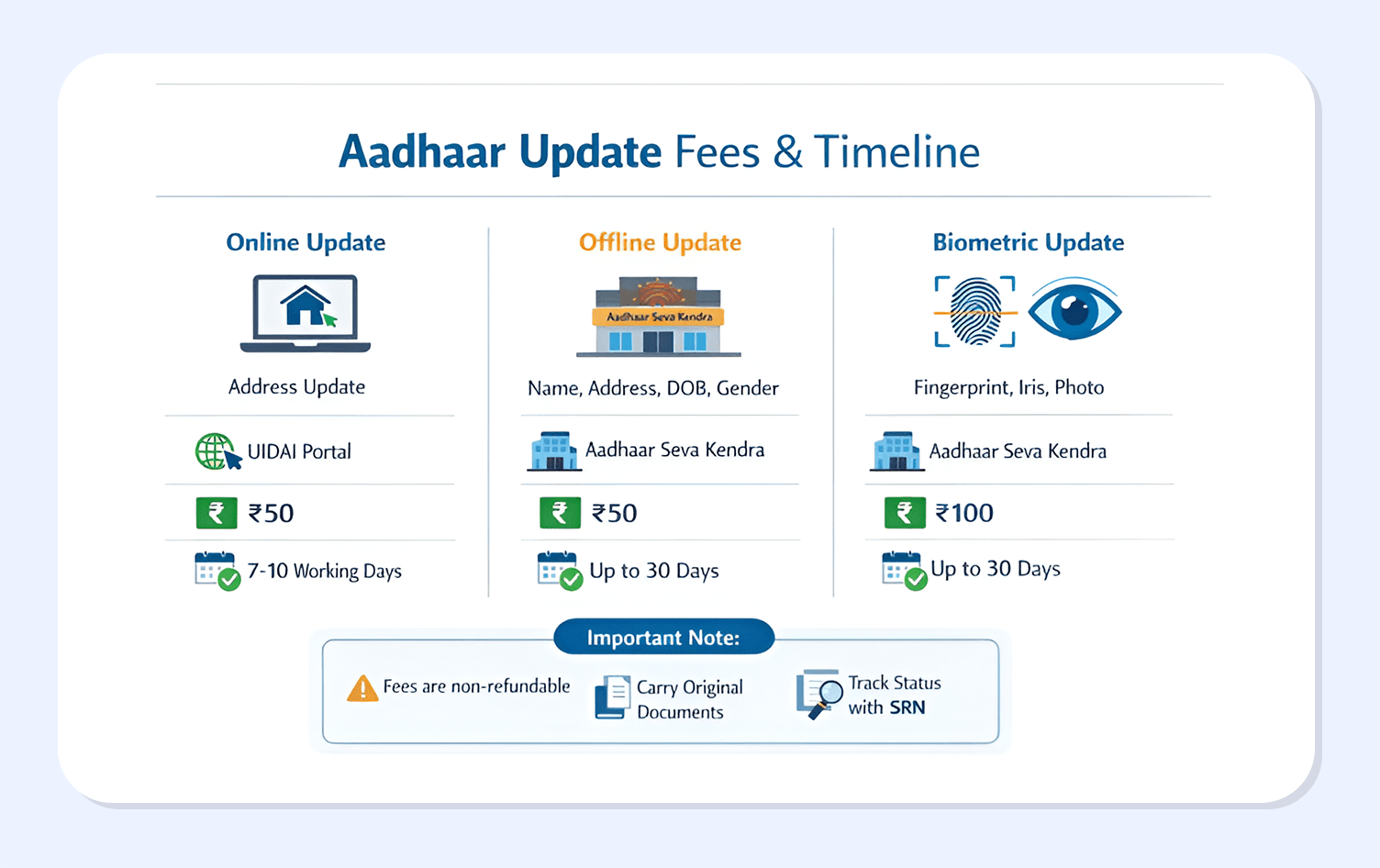
Aadhaar Update Fees And Timeline
Charges against Aadhar updation have been standardised by UIDAI to ensure affordability and transparency. You must understand the Aadhaar update process efficiently to help with seamless experiences.
Aadhar Updated Charges
Online update charges: Charges for online updation are INR 50 as per request
Offline update charges: Offline updates have a charge of INR 50 as well. Biometric updates at the Aadhaar Seva Kendra are charged up to INR 100.
Typical processing duration
Online update charges: Online updates take up to 7 to 10 working days for completion.
Offline update charges: Offline updates take up to 30 days for completion.
Biometric updates at the Aadhaar Seva Kendra: These updates also take up to 30 days.
Latest Updates 2026
Good news: UIDAI has extended the free online Aadhaar document?upload facility on the myAadhaar portal for one more year, the service is free until June 14, 2027.
What that means for you: you can upload or refresh Proof of Identity (PoI) and Proof of Address (PoA) documents on the myAadhaar portal without paying the earlier online charges; offline centre updates will still attract the usual fee.
Quick steps (1 line): Log in to myAadhaar with your Aadhaar number and OTP, open Document Update, upload your PoI/PoA files, submit, and download the acknowledgement slip.
Conclusion
To obtain uninterrupted government and financial services, your Aadhaar details must be updated. Starting with the completion of your Aadhaar to receiving subsidies and filing taxes, updated Aadhaar information always helps to avoid rejections and delays.
The UIDAI has made the updation and correction process more flexible by providing both online and offline modes. At the same time, offline modes are used for major demographic updates and biometrics. Online Aadhaar updates are best suited for quick address changes.
Trusted platforms such as Grip Invest offer seamless access to curated opportunities with accurate KYC data, enabling faster onboarding. Although a small step, keeping your Aadhaar updated can support long-term financial efficiency and compliance.
Visit Grip Invest to start investing in a curated list of opportunities across bonds and alternative assets.
FAQs How To Update Aadhaar Online And Offline
1. How many times can Aadhaar be updated?
Depending on what you want to update, UIDAI allows updates accordingly. Your name can be updated twice in your lifetime, your date of birth can be updated once, your gender can be updated once, your address can be updated any number of times, your mobile number and email ID can be updated without limits, and biometric details such as fingerprints and iris can be updated multiple times.
2. How long does an Aadhaar update take?
The time taken to update your Aadhaar depends on what you are updating. For the online update of the address, it usually takes 7 to 10 working days. Updating Aadhaar offline, via the Aadhaar Seva Kendra, may take up to 30 days. Biometric updates take longer to complete due to the need for manual verification.
3. Can Aadhaar be updated without documents?
No, it is not possible to update your Aadhaar without your documents. Address updates need valid proof of address, corrections in name, and DOB need supporting identity documents.
References:
1. PIB, accessed from: https://www.pib.gov.in/PressReleasePage.aspx?PRID=2163733&utm_source=chatgpt.com
Want to stay at the top of your finances?
Join the community of 4 lakh+ investors and learn more about Grip Invest, the latest financial knick-knacks, and shenanigans in the world of investing.
Happy Investing!
Disclaimer - Investments in debt securities/municipal debt securities/securitised debt instruments are subject to risks including delay and/ or default in payment. Read all the offer related documents carefully. The investor is requested to take into consideration all the risk factors before the commencement of trading.
This communication is prepared by Grip Broking Private Limited (bearing SEBI Registration No. INZ000312836 and NSE ID 90319) and/or its affiliate/ group company(ies) (together referred to as “Grip”) and the contents of this disclaimer are applicable to this document and any and all written or oral communication(s) made by Grip or its directors, employees, associates, representatives and agents. This communication does not constitute advice relating to investing or otherwise dealing in securities and is not an offer or solicitation for the purchase or sale of any securities. Grip does not guarantee or assure any return on investments and accepts no liability for consequences of any actions taken based on the information provided. For more details, please visit www.gripinvest.in
Registered Address - 106, II F, New Asiatic Building, H Block, Connaught Place, New Delhi 110001


