

Masked Aadhaar Card: How To Download And When To Use It?


Why reveal your entire Aadhaar number when only basic identity proof is needed?
For many people, this is where the masked version becomes relevant, as it offers a more privacy-conscious alternative for routine use.
If you are planning a masked Aadhaar card download, the first thing to understand is how it compares in a masked vs regular Aadhaar context. Read on to see what sets it apart and how it can be useful.
What Is Masked Aadhaar?
UIDAI masked Aadhaar version of e-Aadhaar, where the first 8 digits of the 12-digit Aadhaar number are replaced with xxxx-xxxx and leaves only the final four on display. The standard copy, by comparison, carries the entire number. The real distinction lies in how much personal data is revealed, not in the legal standing of the record.
The masked Aadhaar PDF still retains the essentials needed for identification. That includes the holder’s name, address, gender, date of birth, photograph, and the last four digits. Its QR code also reflects a concealed mobile number and a concealed email ID, allowing verification without laying bare the full set of details.
Many people opt for this format when a simple proof of identity is required, and complete disclosure would be excessive. It offers a more guarded way to submit credentials in everyday situations.
At the same time, it remains a valid e-Aadhaar and carries the same functional value as the regular digital copy.
How Masked Aadhaar Card Download Works?
If you are wondering how the masked Aadhaar card download works, here is a simple breakdown:
1. Official portal
This facility is available through the official MyAadhaar platform. That matters because the document is issued through UIDAI’s own digital framework, not through any outside website or unofficial service.
2. Accepted details for access
Access can be initiated with any one of three identifiers: your Aadhaar number, VID (Virtual ID), or EID (Enrolment ID), depending on which detail you have on hand.
3. Aadhaar download OTP
Before the document is released, the system sends an OTP to the mobile number linked to your record. After that check is completed, the file becomes available in a password-protected format.
4. E-Aadhaar password to open the PDF
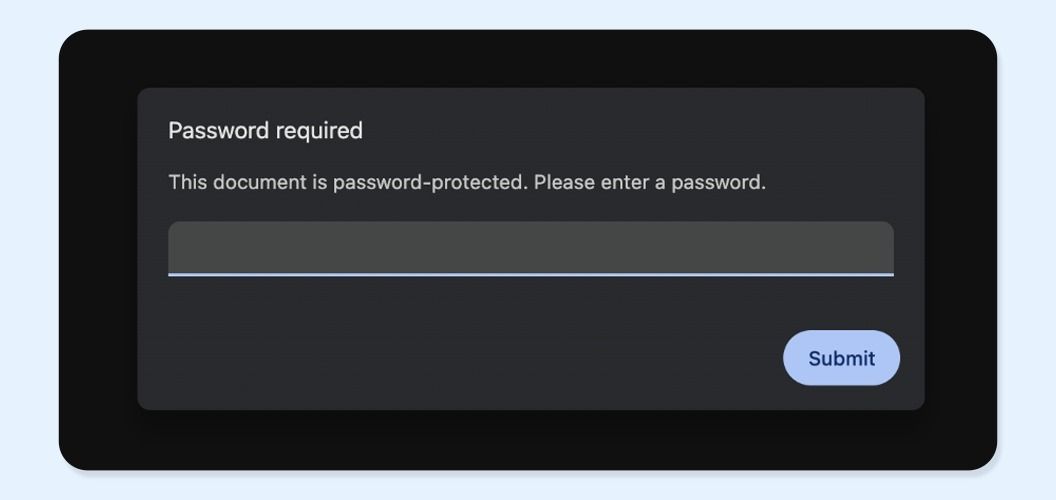
The downloaded record opens with a set combination based on your personal details. It uses the first four letters of your name in capital letters, followed by your year of birth in YYYY format. For instance, ABCD1999.
Steps To Download Masked Aadhaar
There are three common ways to access a masked Aadhaar copy online through the UIDAI portal, the mAadhaar app download, and DigiLocker.
1. Step by step on the UIDAI portal
If you want the most direct route, the official MyAadhaar portal is the clearest option. UIDAI says e-Aadhaar can be downloaded from MyAadhaar.
1. Open the MyAadhaar download page on the UIDAI website (https://uidai.gov.in/).
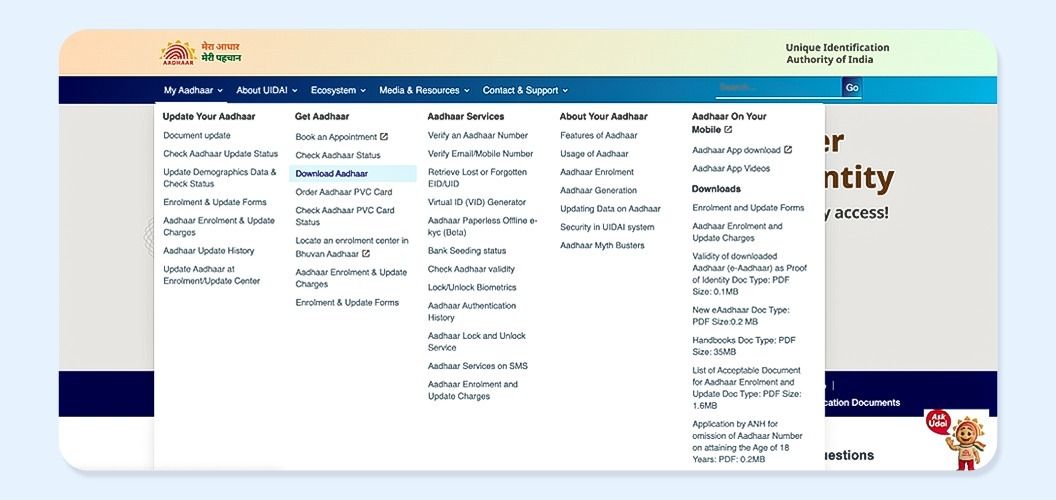
2. Enter any one identifier, which can be your Aadhaar number, EID, or VID.
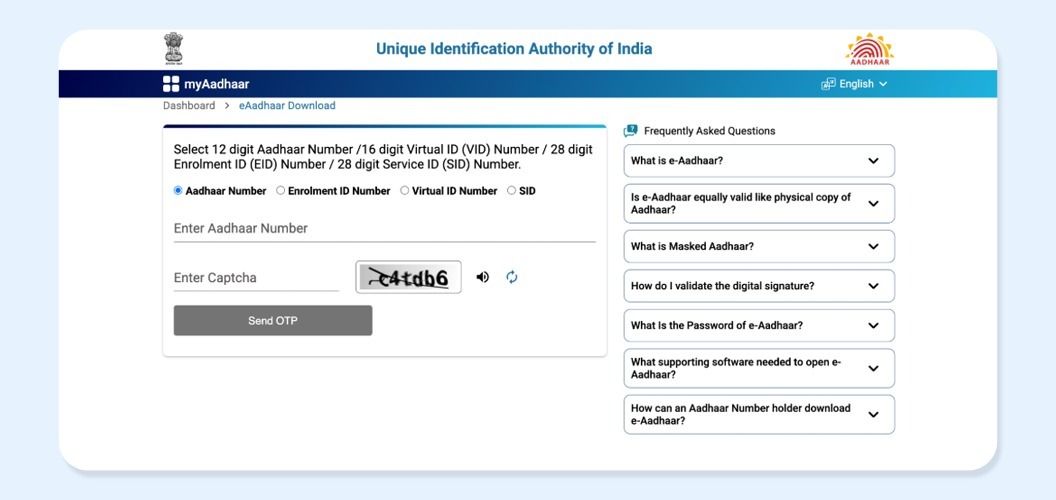
3. Select “Do you want a masked Aadhar?” and complete the OTP check sent to your registered mobile.
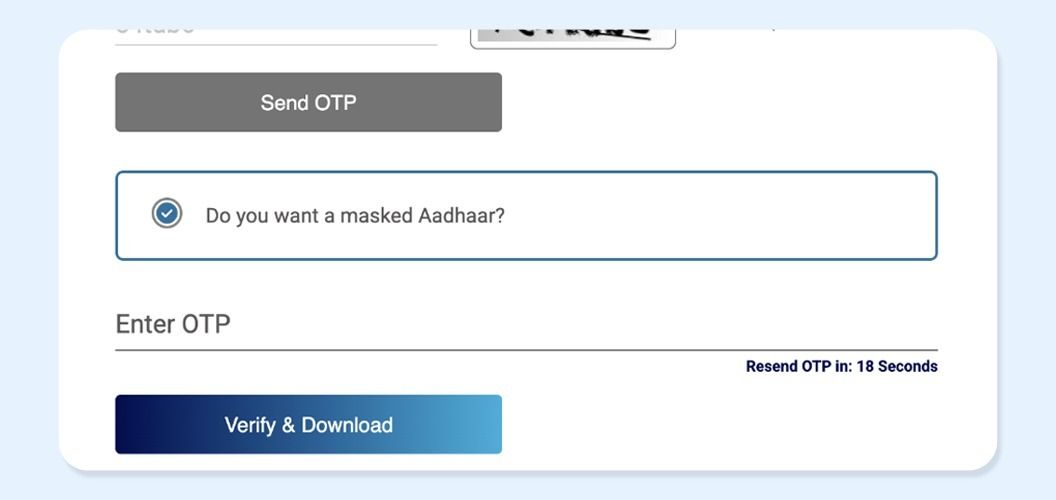
4. Download the e Aadhaar file in masked format.
5. Open the PDF with the password format prescribed by UIDAI, namely the first four letters of your name in capitals and your year of birth in YYYY format.
2. Step by step on mAadhaar app
The mAadhaar app can also be used for e-Aadhaar access. However, only a person whose Aadhaar is linked to a registered mobile number can create a profile in the app.
1. Install the official mAadhaar app and launch it on your phone.
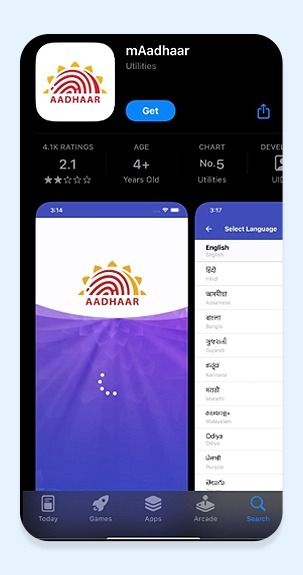
2. Register your profile by creating the four-digit app PIN and entering your Aadhaar number with the captcha.
2. Verify the profile with the OTP sent to your registered mobile number.
3. Open the app dashboard and use the Aadhaar download facility available within the app.
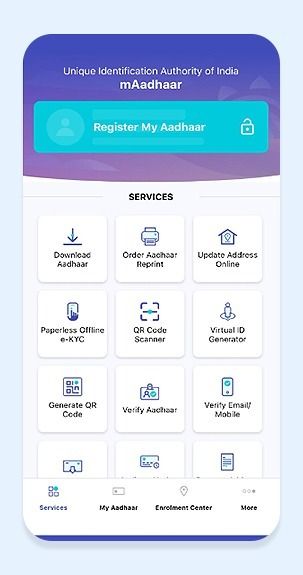
4. Select the masked Aadhaar option, enter your Aadhaar number or VID, verify with OTP, and download the file. Open it using the standard password format as noted earlier.
3. Step-by-step on DigiLocker
DigiLocker is a MeitY platform for authentic digital documents, and its Aadhaar entry page allows sign-in or account creation using Aadhaar or VID.
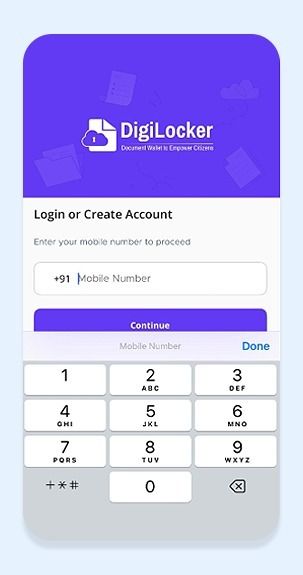
1. Sign in to DigiLocker Aadhaar, or create an account if you do not already have one.
2. After account access, go to your issued documents section and fetch the Aadhaar document if it is available in your wallet. DigiLocker says issued documents are authentic digital records provided through the platform.
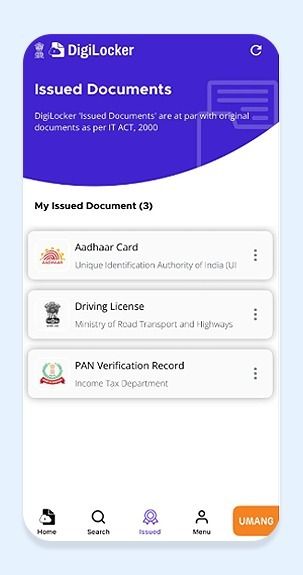
3. Save or download the Aadhaar from the issued documents section. Once opened, check that it shows only the last four digits before using or sharing it.
Common Mistakes That Block Download
Most failures happen because the verification chain breaks somewhere along the way. UIDAI says OTP for e Aadhaar download goes only to the registered mobile number, and mAadhaar profile creation also requires that linked number. DigiLocker likewise notes that Aadhaar linking depends on the mobile being linked with Aadhaar.
- Entering the wrong identifier. Aadhaar number, VID, and EID are accepted on UIDAI, but they must be valid and correctly keyed in.
- Trying to proceed without access to the registered mobile. That usually stops OTP verification at once.
- Using the wrong password for the file. UIDAI’s format is exact, so even a small mismatch can prevent access.
- Expecting full app features on mAadhaar without profile registration. UIDAI says several services are limited unless the registered mobile is used to create the profile.
- Assuming DigiLocker will always be the best path for a masked PDF. It is useful for Aadhaar access, but the UIDAI portal is the cleaner route when the requirement is specifically a masked e-Aadhaar file. This last point is an inference based on UIDAI’s direct masked Aadhaar guidance and DigiLocker’s broader document wallet framework.
Masked Aadhaar vs Regular Aadhaar
| Basis | Masked Aadhaar | Regular Aadhaar |
| Number shown | Only the last 4 digits are visible | Full 12 digits visible |
| Privacy | More private for routine sharing | Less private, as full number is shown |
| Use case | When a full number is not needed | When a full number is specifically required |
| Validity | Valid e-Aadhaar | Valid Aadhaar document |
Benefits And Limitations
Masked Aadhaar offers a practical balance between convenience and privacy, though it may not fit every verification requirement.
- Better privacy protection: Only the last four digits remain visible, while the rest are concealed. That makes disclosure more limited and reduces the risk of exposing unnecessary personal information during routine verification.
- Easy digital access: This version can be obtained online through UIDAI’s official ecosystem. The process is fairly smooth for users with a registered mobile number, and the file is delivered through a secure, password-protected route.
- Still a valid UIDAI-issued document: Its acceptance does not weaken simply because part of the identifier is hidden. It continues to stand as an authorised electronic record issued within the UIDAI framework.
Limitations for cases requiring full Aadhaar visibility: Certain institutions or procedures may ask for the complete identifier rather than a partially concealed one. In those circumstances, the regular version may prove more appropriate because it presents the entire set of details at a glance.
Conclusion
Masked Aadhaar offers a practical balance between usability and privacy by limiting exposure of your full Aadhaar number while still serving most routine verification needs. It is easy to access through official digital channels and secured with a standardized password format, making it both convenient and safe for everyday use. However, since acceptance can vary across institutions, it is important to be prepared with the full Aadhaar when required for stricter KYC or identity verification processes.
FAQs On Masked Aadhaar Card Uses
 |
Author: Grip Invest Editorial Team The Grip Invest Editorial Team is a group of Chartered Accountants, MBA (Finance) graduates, and Qualified Research Analysts dedicated to helping you invest smarter. We dive deep into India's fixed income landscape to deliver content that is accurate, up-to-date, and easy to understand. Whether you're exploring bonds, fixed deposits, or other fixed income opportunities, our guides cut through the noise and give you the clarity to make better financial decisions. |
Want to stay at the top of your finances?
Join the community of 4 lakh+ investors and learn more about Grip Invest, the latest financial knick-knacks, and shenanigans in the world of investing.
Happy Investing!
Disclaimer - Investments in debt securities/municipal debt securities/securitised debt instruments are subject to risks including delay and/ or default in payment. Read all the offer related documents carefully. The investor is requested to take into consideration all the risk factors before the commencement of trading.
This communication is prepared by Grip Broking Private Limited (bearing SEBI Registration No. INZ000312836 and NSE ID 90319) and/or its affiliate/ group company(ies) (together referred to as “Grip”) and the contents of this disclaimer are applicable to this document and any and all written or oral communication(s) made by Grip or its directors, employees, associates, representatives and agents. This communication does not constitute advice relating to investing or otherwise dealing in securities and is not an offer or solicitation for the purchase or sale of any securities. Grip does not guarantee or assure any return on investments and accepts no liability for consequences of any actions taken based on the information provided. For more details, please visit www.gripinvest.in
Registered Address - 106, II F, New Asiatic Building, H Block, Connaught Place, New Delhi 110001


