

FD Auto Renewal Explained: Benefits, Risks, And How To Turn It Off


Fixed deposits are one of the most trusted and secure sources of investment in India. It has been used for decades by investors who prefer safe and predictable returns. Even today, many traditional investors choose to invest in FDs because they are stable, guarantee interest, and protect them from market volatility.
However, today, banks provide a unique feature of FD auto-renewal to make investing in FDs easier and more convenient.
This definitely has some advantages for many investors, but it also comes with some potential risks. Do you not know much about this? Read on to understand in detail.
What Is FD Auto Renewal?
FD Auto Renewal is an automated feature offered by the bank that applies when your fixed deposit matures; it automatically renews for another term. This means instead of the maturity amount being transferred to your savings account, it will automatically be used by the bank to reinvest the money into a new FD.
A bank, after enabling the auto-renewal feature, can create a new FD using the maturity amount with principal and interest.
These new deposits opened by the bank have the same tenure as the original FD, but the latest interest rate is applied, as the deposit is automatically reinvested after maturity.
How Does Auto Renewal Work?
When you open an FD account, the bank provides an option to enable or disable auto-renewal of your FD after its maturity. If you choose to enable this auto-renewal option, then only the bank can renew your matured FD with a new fixed deposit with the current interest rate available at that moment.
This means the renewed FD may earn a different interest rate than the original one, depending on market conditions.
Benefits And Risks Of Auto-Renewal
The auto-renewal provides convenience to the investors but also needs some careful monitoring. Some key benefits and risks to consider before opting for auto-renewal in FDs.
FD Auto Renewal Benefits
1. Convenience and time-saving
Auto-renewal eliminates the need to manually renew your FD. Your money remains invested automatically without visiting the bank or logging into your account.
2. Continuous earning
Your funds keep earning interest without any gap. This prevents your maturity amount from sitting idle in a savings account with lower interest.
3. Compounding advantage
When the maturity amount (principal + interest) is reinvested, it helps generate higher long-term returns through compounding.
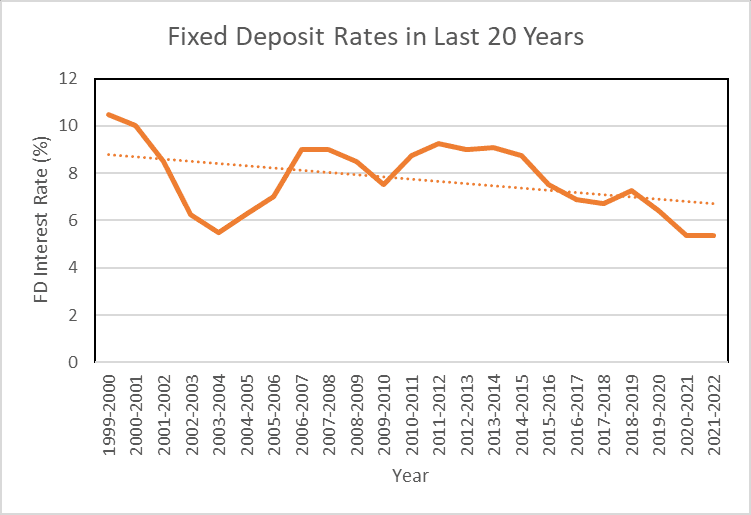
Source: SIP Calculator1
Risks of Auto Renewal
1. Interest rate changes
The new FD will be created at the current interest rate, which might be lower than your previous rate if market rates have fallen.
2. Locked-in funds again
If the FD is renewed automatically, then your money gets locked for another tenure. Premature withdrawal may involve penalties or reduced interest as well.
3. Missed better investment options
Auto-renewal may cause you to miss better investment opportunities, such as higher-rate FDs, mutual funds, or other financial products.
How To Enable Or Disable Auto Renewal?
You can manage your auto-renewal feature option very easily by either enabling or disabling the auto-renewal feature through an online and offline process, and this is called the fixed deposit renewal process.
- Online Process through Net Banking
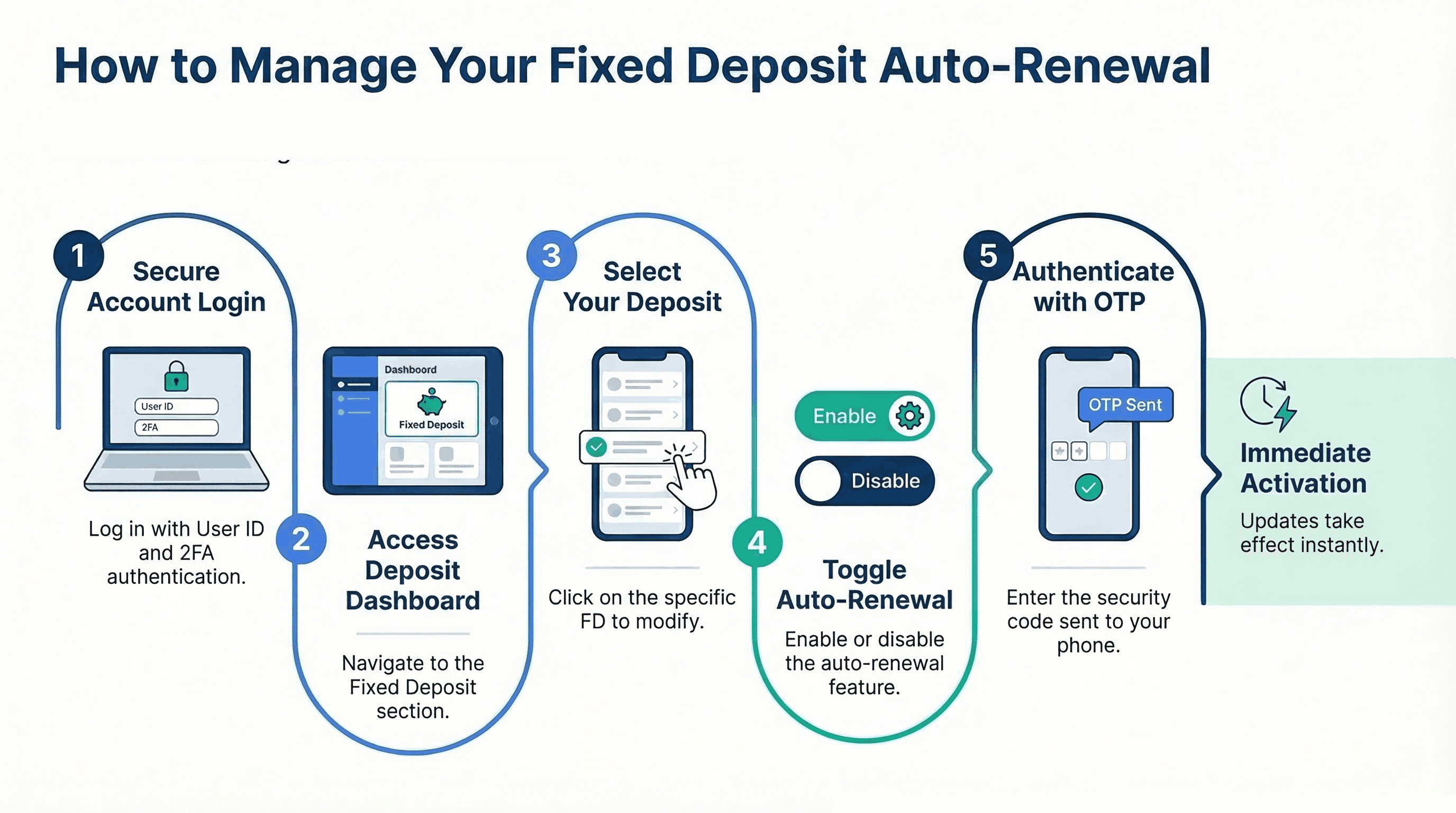
You can manage auto-renewal through your bank’s online banking platform, like Net Banking. To do this, follow these easy steps on your phone or pc.
Step 1: Log in to the account
Go to the official website of your bank and then log in to your investment platform or net banking account using your user ID and password by verifying through a two-step authentication process for security reasons.
Step 2: Go to the Fixed Deposit section
After logging in, navigate to the Deposits or Fixed Deposit section in the dashboard, which will have all the information about your current FD plan.
Step 3: Select the FD you want to modify
Now select your desired FD that you want to modify, and by clicking on it, you find the detailed information about the deposit along with available options to manage it.
Step 4: Choose Enable or Disable Auto Renewal
Now, after clicking the desired FD details, you can choose to modify them either by enabling or disabling the auto-renewal option in them.
Step 5: Confirm the changes
After confirming your desired option for the auto-renewal, confirm the changes by submitting the request. In this, most banks will require an OTP for security authentication. The update usually takes effect immediately.
- Offline Bank Branch Process
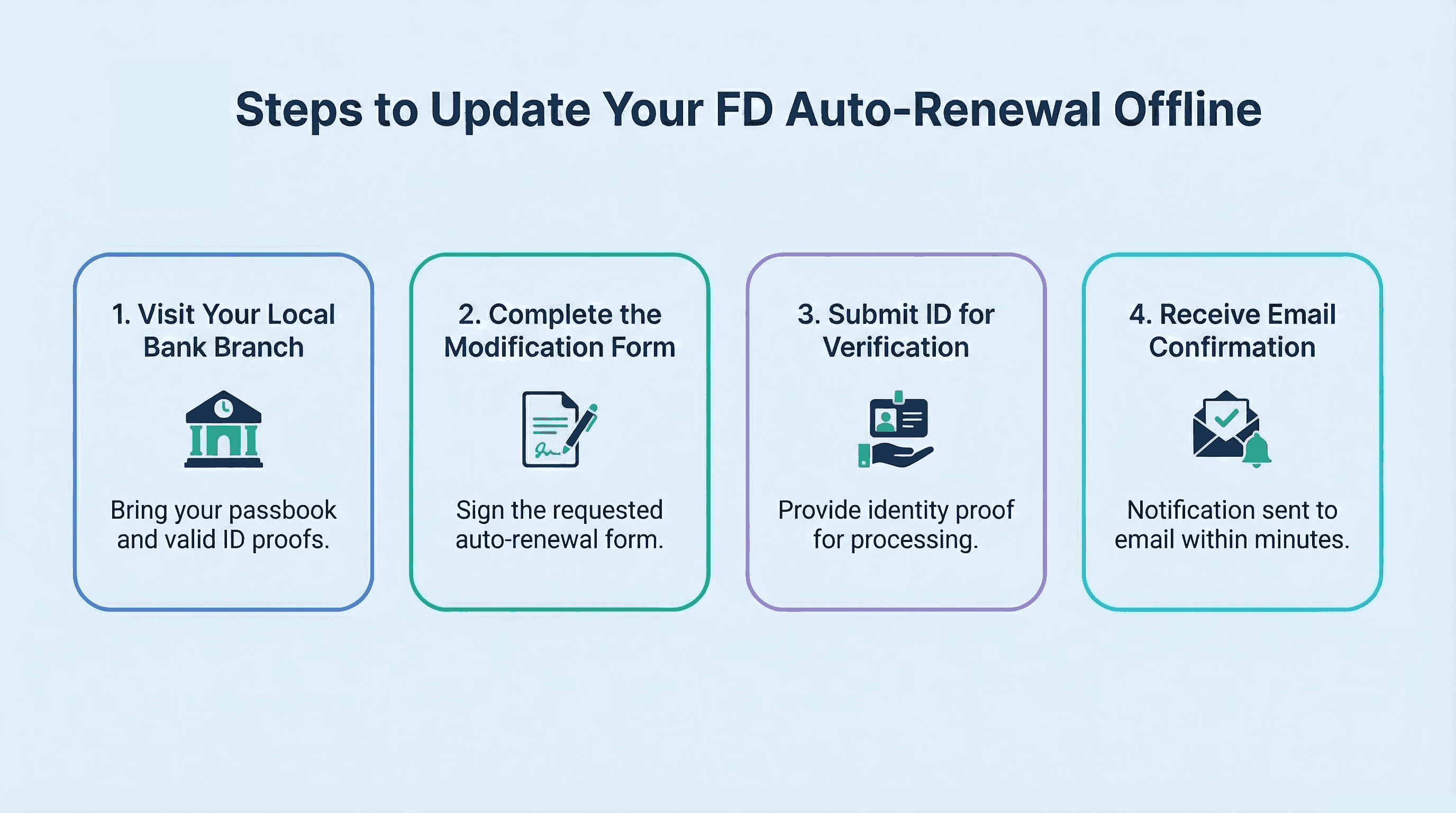
The process of changing the auto-renewal option can also be done by an offline bank visit, which requires a few easier steps than the online one.
1. Visiting the Bank
For the offline modification process, visit your nearest bank branch during its working hours. It is advised to take necessary documents like a passbook and ID proofs as well.
2. Filling out a Form
Request a form to modify the auto-renewal option in your FD account and fill out that form with the correct information, with your signature. You can take help from the bank staff for filling out the form.
3. Submitting ID verification
The bank can ask for identity proof, like an ID card, for identity verification, and then only your request will be processed with the bank. After this, within a few minutes, you will get an email about the update.
Conclusion
FD auto-renewal is a useful process for investors who want a hassle-free way to keep their money invested for a long time. It helps ensure that their funds continue earning interest without needing manual actions every time their deposit matures. However, you should still review your FDs annually, as interest rates can change over time.
If you are planning to invest in fixed-income deposits, consider signing up with Grip Invest. It is an investor-first platform that emphasises user-friendliness. In fact, it allows you to start investing at INR 1000 only! So what are you waiting for? Start investing with Grip Invest today.
FAQs On FD Auto Renewal
1. What is auto-renewal in FD?
Auto Renewal is the future where a fixed deposit is automatically reinvested for a new term of maturity using the maturity amount.
2. Can auto-renewal be cancelled?
Yes, you can cancel the auto-renewal any time through net banking, mobile banking or by visiting the bank branch physically.
3. Does the interest rate change after renewal?
Yes, the renewed FD will be created at the current rate offered by the bank at the time of renewal, which can be higher or lower than the previous interest rate.
4. Is FD auto renewal done for the same tenure?
Yes, in most cases banks renew the fixed deposit for the same tenure as the original FD. However, the renewed deposit will earn interest at the rate applicable at the time of renewal, not the original rate.
5. Is there a grace period to stop FD auto renewal after maturity?
Some banks provide a short grace period, usually around 7 to 14 days after maturity, during which you can modify or cancel the renewal instructions. The exact duration may vary depending on the bank’s policy.
6. Is tax applicable on FD after auto renewal?
Yes, interest earned on fixed deposits remains taxable even if the FD is auto renewed. The interest income is added to your total taxable income and taxed according to your income tax slab.
Reference:
1. SIP Calculator, accessed from: https://sipcalculator.in/images/blog/FD-Rate-in-Indian-Bank.png
Want to stay at the top of your finances?
Join the community of 4 lakh+ investors and learn more about Grip Invest, the latest financial knick-knacks, and shenanigans in the world of investing.
Happy Investing!
Disclaimer - Investments in debt securities/municipal debt securities/securitised debt instruments are subject to risks including delay and/ or default in payment. Read all the offer related documents carefully. The investor is requested to take into consideration all the risk factors before the commencement of trading.
This communication is prepared by Grip Broking Private Limited (bearing SEBI Registration No. INZ000312836 and NSE ID 90319) and/or its affiliate/ group company(ies) (together referred to as “Grip”) and the contents of this disclaimer are applicable to this document and any and all written or oral communication(s) made by Grip or its directors, employees, associates, representatives and agents. This communication does not constitute advice relating to investing or otherwise dealing in securities and is not an offer or solicitation for the purchase or sale of any securities. Grip does not guarantee or assure any return on investments and accepts no liability for consequences of any actions taken based on the information provided. For more details, please visit www.gripinvest.in
Registered Address - 106, II F, New Asiatic Building, H Block, Connaught Place, New Delhi 110001


