

How To Check NPS Balance: Step-by-Step Guide For Investors


According to the PGIM India Mutual Fund Retirement Readiness Survey 2025, just 37% of respondents had a retirement plan in 2025, a steep decline from 67% in 2023, despite the fact that retirement has become Indians' top financial goal1.
In such a scenario, it is important to remember that even if retirement feels like a distant milestone, optimal decisions and steps today are crucial for a secure tomorrow.
Investments like the National Pension System (NPS) offer a government-backed, voluntary retirement savings opportunity, which pools periodic investor contributions and invests in a bucket of debt, equity, and other assets.
2024-25 witnessed a 23% expansion of the Asset Under Management (AUM) of NPS and the Atal Pension Yojana (APY), as it reached INR 14.43 lakh crore by the end of March 20252. The total subscriber base also became more than 165 lakh during the tenure.
Yet, despite this rising popularity, NPS investors often skip their NPS balance check online or offline. Tracking the NPS balance is more than just watching investments grow; it is crucial to control the retirement trajectory.
Understanding how to check the NPS balance helps verify if the contributions are credited correctly, assess whether the fund allocations match risk appetite, and make adjustments if necessary.
Therefore, this blog decodes how to check the NPS balance in detail.
Ways To Check NPS Balance Online
The fastest and most convenient method of checking the NPS balance is online. There are three key ways to check the NPS statement online.
NPS CRA Login
A Central Recordkeeping Agency (CRA) acts as the technical backbone and core administrative service provider of the NPS. It stores subscriber data, like transactions and contribution records. As of April 7, 2026, Protean eGov Technologies Limited (previously known as NSDL e-Governance Infrastructure), CAMS NPS, and KFintech are the three CRAs connected to NPS3. Discussed below are the steps to check the NPS balance through a CRA login.
Step 1: Visit the CRA website that issued the Permanent Retirement Account Number (PRAN). The table below lists the links to the three CRAs associated with NPS.
| CRA | Website |
| NSDL NPS login (Protean) | https://cra.nps-proteantech.in/CRA/ |
| KFintech NPS login | https://nps.kfintech.in/Login/Login |
| CAMS NPS login | https://app.camsnps.in/CRA/auth/subscriber-portal/login?source=SUBSCRIBERPORTAL |
Step 2: Log in using the PRAN and Password.
Step 3: Investors must also enter the User ID, Captcha, and complete the necessary verification steps.
Step 3: Once logged in, investors need to navigate to the Holding Statement or Transaction Statement section. Here, they can view the Tier-I and Tier-II account balance, contribution history, NAV-based unit holdings, and so on.
NPS Mobile App
Investors can check their NPS account balance through the NPS by Protean App and the NPS account details using the steps given below.
Step 1: Download the NPS by Protean App from the Google Play Store or App Store.
Step 2: Enter the PRAN and Password to log in.
Step 3: The user-friendly investment dashboard shows the current holdings and all the other necessary NPS balance details in the Tier-I and Tier-II accounts.
Moreover, the Point of Presence (POP), like a private or public bank, with which the investor made the NPS account, can also help find the NPS balance. Investors may check their NPS balance using the app offered by the POP.
Email Statements: Check NPS Balance UMANG App
The CRA through which the NPS account is made may periodically send email statements to the registered email address of the investor. However, an investor might want to derive their NPS balance statement via email during a particular time, when a periodic statement is not due. In such a scenario, if an investor wants their NPS holding statement online through email, they can use the Umang app. Discussed below are the steps that must be followed.4
Step 1: Download the UMANG app from the Google Play Store or App Store, and log in.
Step 2: This app contains access to key government services, including investments in Government Schemes. Navigate to the NPS investment section.
Step 3: With the NPS PRAN login details, investors can select the Email Transaction Statement option.
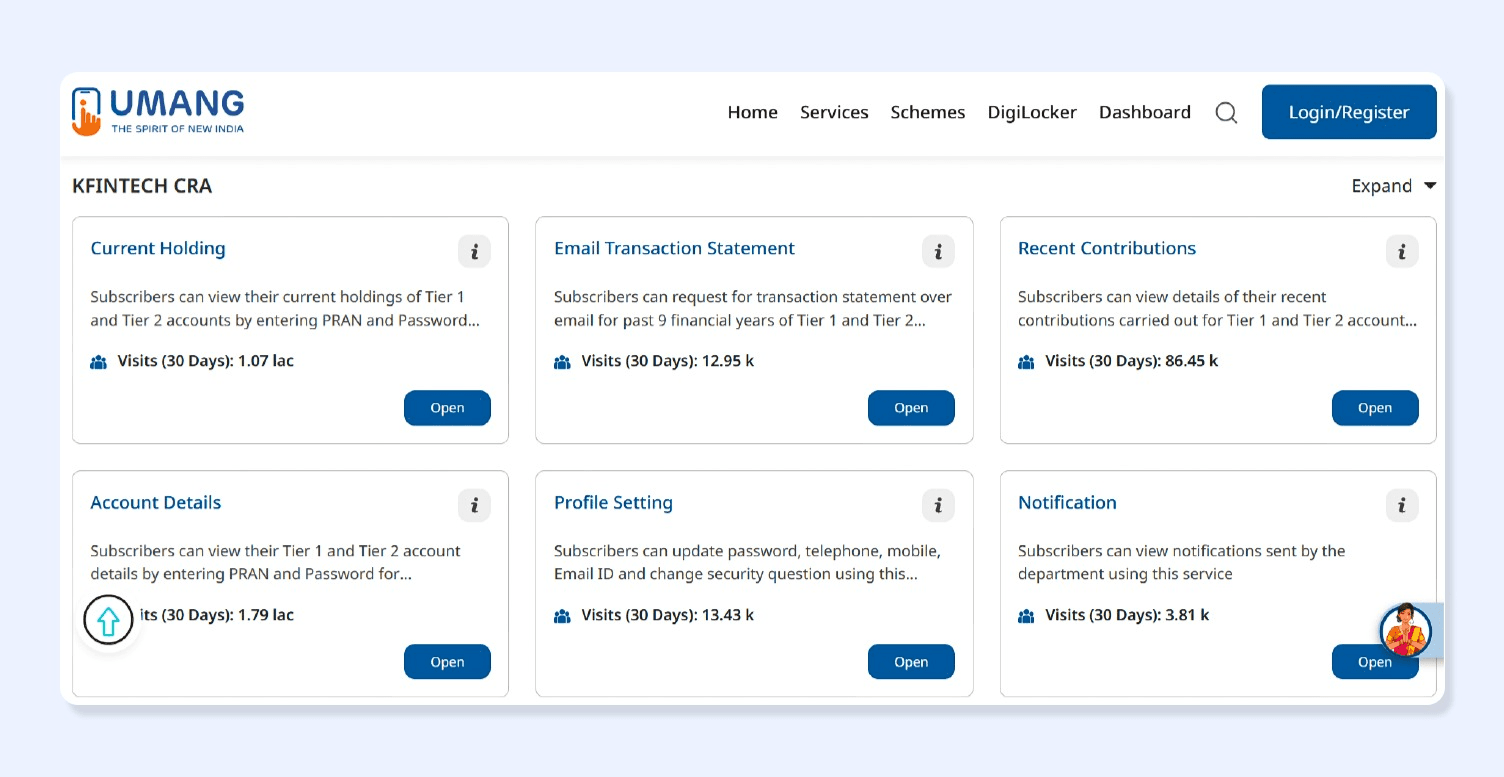
Once selected, investors will receive an email containing a transaction statement for the last 9 financial years, pertaining to their Tier-I and Tier-II accounts.
Although the process of NPS transaction statement download or email receipt is fairly simple, many investors might not find it convenient, especially senior citizens or investors lacking digital skills. Therefore, a guide on how to check the NPS balance is incomplete without explaining the offline methods of balance.
How To Check NPS Balance Offline
NPS investors can also check their NPS account balance offline, either through their PoP or via SMS and missed call service. Discussed below is the detailed explanation of the procedure.
1. NPS Balance Check Through PoP-SP Centres: Point of Presence Service Providers (PoP-SP) include banks and post offices, which act as physical touchpoints where investors can visit to create or query about NPS investments. Investors can visit the PoP-SP centre, where they created their NPS account, to get their NPS account balance. Investors must remember to carry their necessary documents and details, like PRAN, identity proof, etc.
2. SMS and Missed Call NPS Balance Check: Investors can give a missed call on 1800-210-0080 or 9212993399 from their registered mobile number to receive their account balance details via SMS6.
While there are various online and offline mechanisms to derive the NPS account balance, investors must understand the various parameters mentioned in the statement to make the statement useful. If an investor does not understand the meaning of say Tier-I or II accounts, Net Asset Value (NAV), etc., the statement cannot help analyse the efficiency of the NPS investment.
Understanding Your NPS Statement
Once an investor gets access to their NPS statement, understanding how to interpret it is key. Discussed below are explanations of some key terminologies.
Tier 1 VS Tier 2 Account
There are two types of accounts in NPS. The table below explains what they are by comparatively analysing them.
| Parameter | NPS Tier-I Account | NPS Tier-II Account |
| Meaning | It is the permanent account in which contributions are made | This is a voluntary or optional account which allows withdrawals |
| Condition | To invest in an NPS Tier-I account is a must | Investors can create a Tier-II account only if they already have an active Tier-I account |
| Withdrawals | Restricted withdrawals as per the exit and withdrawal rules | Unrestricted withdrawals |
| Minimum Contribution to Open | INR 500 | INR 250 |
| Minimum Annual Contribution | INR 1,000 | No restrictions |
| AMC Charges | Applicable | No separate charges |
Source: NPS Trust7
NAV and NPS Returns Explained
Funds pooled via NPS are invested in four asset categories, namely Equity (E), Corporate Bonds (C), Government Securities (G), and Alternative Assets (A).8 Similar to mutual funds, different Pension Fund Managers manage different NPS schemes that have a particular asset allocation, which determines their risk and return profile.
For instance, SBI Pension Funds Private Limited can have a Scheme-E Tier-I, which invests up to 75% (as per permitted limits) of Tier-I investments into equity.
The graph below shows the Scheme-E Tier-I performance of different Pension Fund Managers over a period of 5 years as of 6 April 2026.
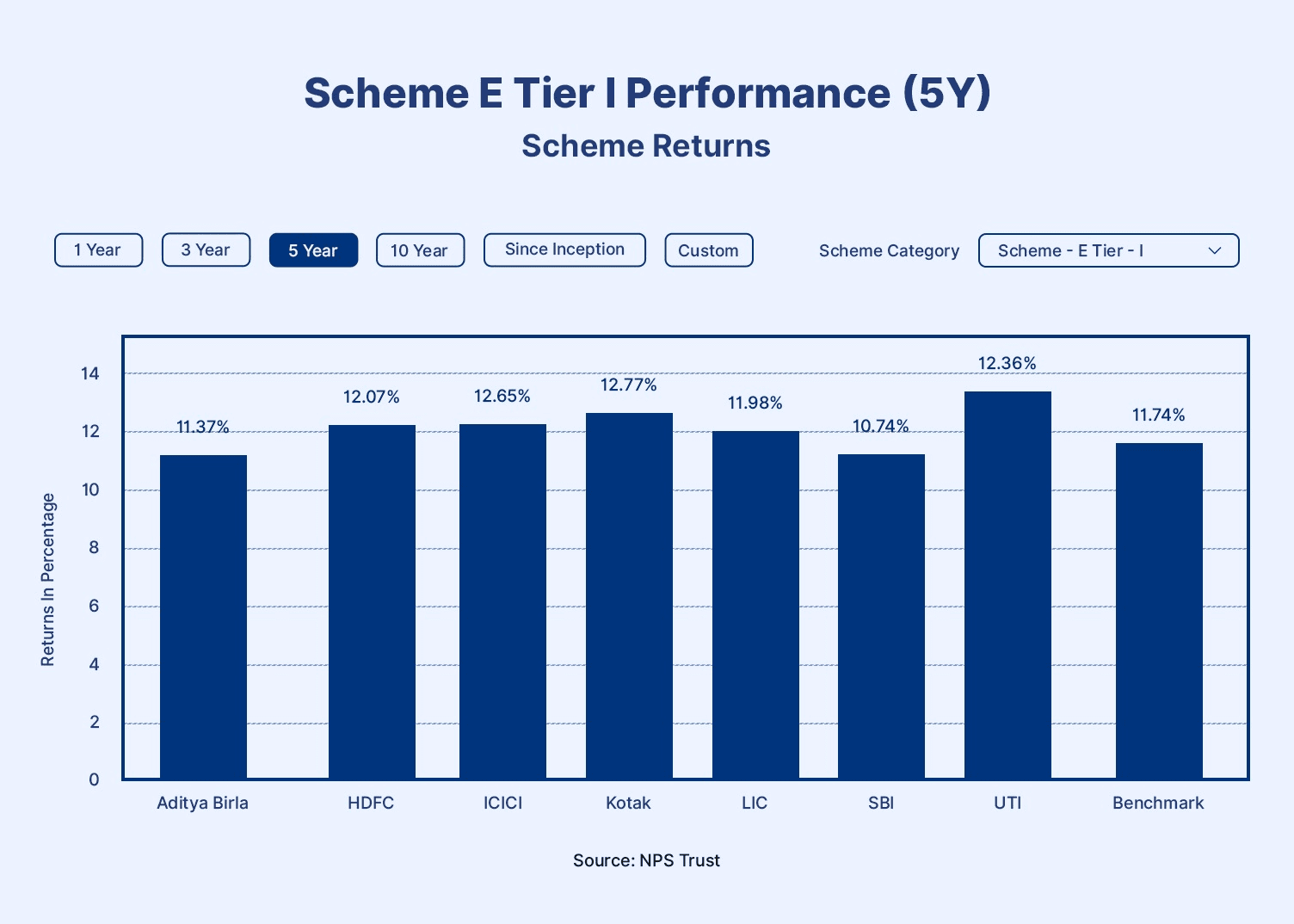
Each day, a Net Asset Value (NAV) is declared for each scheme and fund manager. This NAV represents the market value of the underlying assets, thus the units of the scheme, on the particular date. Imagine Mr K holds 100 units of scheme E Tier-I of XYZ manager. If the NAV of each unit is INR 15, the calculation below shows the return as of the particular date.
Return = Units Held x Current NAV
Returns of Mr K = 100 units x INR 15 = INR 15,000
However, while accessing the NPS account balance, an investor can run into some errors. Understanding the methods of handling technical issues is necessary to explore how to check the NPS balance.
Common Issues And How To Fix Them
While generating the NPS account statement, an investor can run into some technical difficulties. Explained here are the ways to tackle two key issues.
Login Errors
While logging in, an investor might forget their password. In such a scenario, simply click on the Forgot Password option on the login page and follow the steps as they appear. An OTP will be sent to the registered mobile number; investors can use it to reset the password9.
PRAN-Related Issues
In case the investor has forgotten their PRAN number, they can use either of the following methods to recover it.
- Welcome Kit: PRAN is a unique number to identify an NPS account. Therefore, when an investor registers for NPS via a PoP, they might have received a welcome kit containing a PRAN card in their email or physically. This card will contain the number.
- Mobile App: Download the NPS app and navigate to a section titled Recover PRAN, Forgot PRAN, or Know PRAN. Investors might have to enter their Date of Birth, PAN, registered mobile number, OTP, and so on, to recover their number.
- SMS or Email: An NPS investor often receives emails or SMS from NPS or the CRA regarding various notifications, updates, communications, and so on. Such mail usually contains the PRAN number. Investors can search their email or SMS with keywords like PRAN to recover the number.
- PoP: Investors can also visit or contact their PoP to recover their PRAN.
Tracking Your Overall Retirement Portfolio
Not just NPS investment, investors must track their entire portfolio to ensure that their investments are operating as per their expectations. Periodic portfolio review is crucial not only to maintain risk-return but also to ensure optimal diversification. While NPS offers a government-backed medium for market-linked growth, fixed-income investments are crucial to ensure stable growth.
Conclusion
Knowing how to check your NPS balance is not just about tracking a number on a screen. It helps ensure that your contributions are being credited correctly, your chosen asset allocation still matches your retirement goals, and your long term savings remain on the right path. Whether through the CRA portal, mobile apps, email statements, or offline channels, regularly reviewing your NPS account can help you make better financial decisions before small gaps turn into larger setbacks.
While NPS can form an important part of retirement planning, a well balanced retirement portfolio often needs more than one investment avenue. Along with market linked retirement products, adding stable fixed income assets can help create stronger long term financial security.
Grip Invest offers curated fixed income investment options such as corporate bonds and high yield FDs that can help complement your retirement portfolio with predictable income opportunities.
FAQs On How To Check NPS Balance
 |
Author: Grip Invest Editorial Team The Grip Invest Editorial Team is a group of Chartered Accountants, MBA (Finance) graduates, and Qualified Research Analysts dedicated to helping you invest smarter. We dive deep into India's fixed income landscape to deliver content that is accurate, up-to-date, and easy to understand. Whether you're exploring bonds, fixed deposits, or other fixed income opportunities, our guides cut through the noise and give you the clarity to make better financial decisions. |
Want to stay at the top of your finances?
Join the community of 4 lakh+ investors and learn more about Grip Invest, the latest financial knick-knacks, and shenanigans in the world of investing.
Happy Investing!
Disclaimer - Investments in debt securities/municipal debt securities/securitised debt instruments are subject to risks including delay and/ or default in payment. Read all the offer related documents carefully. The investor is requested to take into consideration all the risk factors before the commencement of trading.
This communication is prepared by Grip Broking Private Limited (bearing SEBI Registration No. INZ000312836 and NSE ID 90319) and/or its affiliate/ group company(ies) (together referred to as “Grip”) and the contents of this disclaimer are applicable to this document and any and all written or oral communication(s) made by Grip or its directors, employees, associates, representatives and agents. This communication does not constitute advice relating to investing or otherwise dealing in securities and is not an offer or solicitation for the purchase or sale of any securities. Grip does not guarantee or assure any return on investments and accepts no liability for consequences of any actions taken based on the information provided. For more details, please visit www.gripinvest.in
Registered Address - 106, II F, New Asiatic Building, H Block, Connaught Place, New Delhi 110001


